
Staging Environments 101: Never Test Updates on a Live Site Again
 Denny G.3 Min. Lesezeit
We have all been there: you log into your WordPress dashboard, see a notification badge showing six pending plugin updates and a core version bump, and click "Update All" directly on your live website. Seconds later, your checkout page throws a fatal PHP error, your CSS layout collapses, or you are staring at the dreaded White Screen of Death.
Updating plugins, themes, or PHP versions directly on a live production website is one of the highest-risk habits in web management. Yet many site owners still skip testing because they assume setting up a test environment requires complex local Docker containers, manual database exports, and tedious DNS reconfigurations.
Modern managed hosting solves this entirely with one-click staging environments. Let’s explore how staging works, why it protects your revenue and SEO, and the exact workflow for safe WordPress updates.
1. What Is a WordPress Staging Environment?
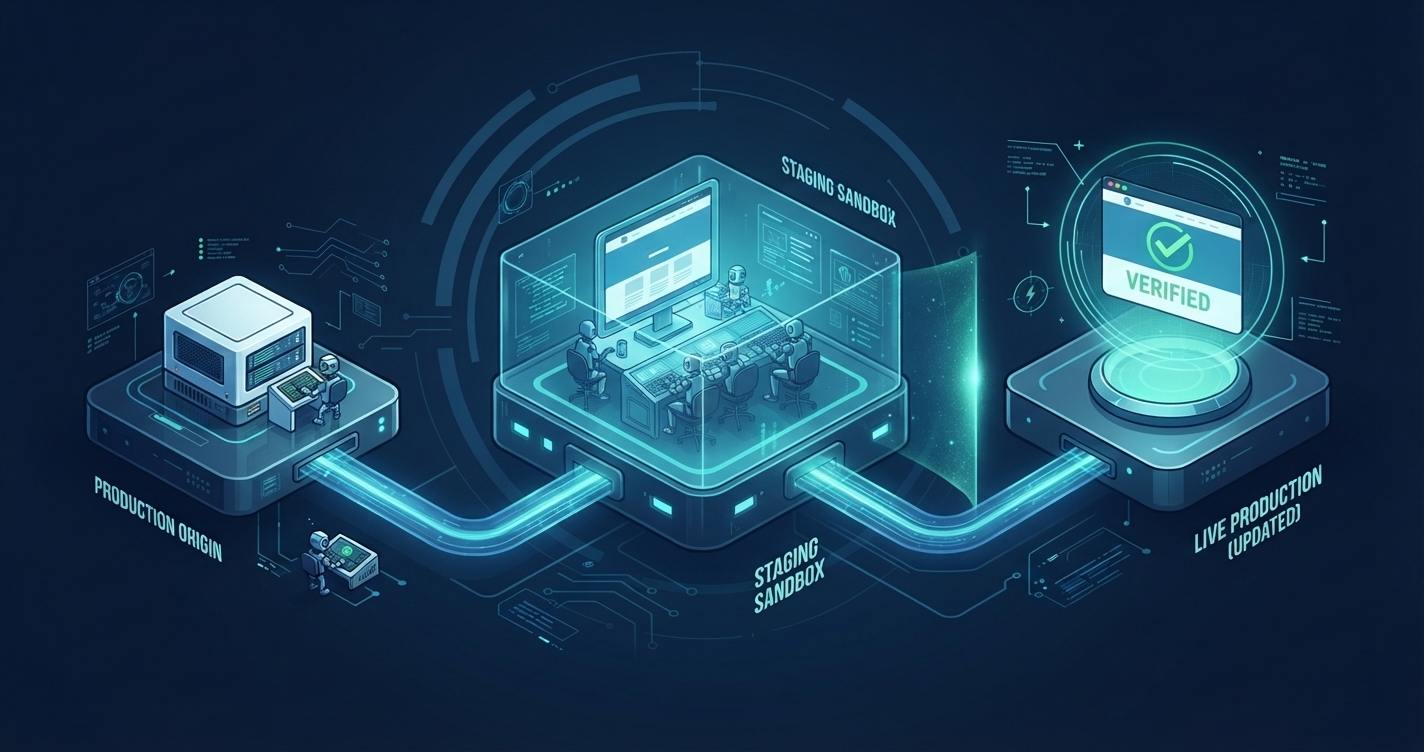
A staging environment is an exact, private clone of your live (production) website hosted on an isolated subdomain or temporary URL (e.g., staging-yoursite.onestopwp.cloud). It duplicates your entire WordPress filesystem, active theme, plugins, and MySQL database into a completely separate sandbox.
+--------------------------------------------------------------------+
|                PRODUCTION VS. STAGING ISOLATION                    |
+--------------------------------------------------------------------+
|  Production (Live)   --> Public-facing site indexed by Google and  |
|                          serving real customers/traffic.           |
|                                                                    |
|  Staging (Sandbox)   --> Private clone with    |
|                          search engine indexing disabled (noindex) |
|                          for zero-risk testing and development.    |
+--------------------------------------------------------------------+
Because the staging instance runs in its own isolated container with a separate database, anything you break, delete, or misconfigure in staging has zero impact on your live visitors.
2. Why Updating Directly on Production Is Dangerous
Even reputable, well-maintained plugins can trigger unexpected conflicts when updated simultaneously or paired with a new WordPress core release:
- CSS & Layout Regressions: Page builders, custom child themes, and third-party add-ons frequently clash after major updates, breaking mobile responsiveness or shifting interactive elements.
- PHP Version Incompatibilities: Upgrading from PHP 8.2 to PHP 8.3 or 8.4 can expose deprecated functions in older plugins, causing fatal runtime errors.
- Checkout & Form Breakages: On WooCommerce or lead-generation sites, a broken JavaScript bundle might not crash the homepage, but it can silently block customers from completing payments-costing you revenue before you even notice.
- SEO & Uptime Penalties: If Googlebot crawls your site while it is displaying a
500 Internal Server Erroror broken layout, search rankings and user trust take an immediate hit.
3. The 4-Step Safe Update Workflow
Using a one-click staging workflow turns stressful maintenance into a predictable, zero-downtime routine:
- Clone Live to Staging: From your hosting control panel, trigger a fresh sync from Production to Staging. This ensures you are testing updates against your exact current database state and active plugin stack.
- Apply Updates & Run Visual Checks: Log into your staging WP Admin and run your core, theme, and plugin updates. Test critical user journeys: submit contact forms, test WooCommerce cart/checkout flows, and inspect mobile layouts.
- Verify Performance & Caching: Clear your staging cache and verify that frontend assets load cleanly without console errors or layout shifts.
- Push Staging to Live: Once everything passes inspection, push your tested changes back to Production.
Effortless One-Click Staging with OneStopWP
At OneStopWP, safe deployment workflows are built directly into your dashboard. Powered by modern architecture and isolated containerized infrastructure, our managed hosting gives you:
- Instant One-Click Staging: Spin up an isolated clone of any WordPress instance in seconds, complete with automatic
noindexprotection so test pages never leak into Google search results. - Safe Cache Testing with WPCacheOn: Test minification, asset deferral, and Redis Object Caching adjustments safely inside staging using our proprietary WPCacheOn plugin (also available on WordPress.org) before deploying optimizations live.
👉 Ready to eliminate update anxiety for good? Explore OneStopWP Managed Hosting plans today.
Sehen Sie sich unsere Tarife an und sichern Sie sich Ihren Rabatt, solange die Aktionen laufen.
Tarife ansehenWeiterlesen
Alle Beiträge → WordPress Hosting & OptimizationFrom 7.0 to 7.1.5: A Roundup of WordPress Core Maintenance and Minor ReleasesOlivia H.Datum: 18. Nov. 2026
 WordPress Hosting & OptimizationOneStopWP Optimizer: Free Security Checks and One-Click Fixes for Every OneStopWP Hosted SiteDenny G.Datum: 9. Nov. 2026
 OneStopWP NewsIntroducing OneStopWP Reseller Hosting: White-Label WordPress for AgenciesOlivia H.Datum: 26. Okt. 2026
Bleiben Sie auf dem Laufenden
WordPress-Hosting-Tipps, Produkt-Updates und Ressourcen direkt in Ihren Posteingang.